Blind Update Tool (BUT)
Purpose
A new tool enabling participants to submit data to AEMO Australian Energy Market Operator, called Blind Update Tool Allows participants to submit a csv formatted payload containing data for new CATS Standing Data fields requiring a value A limited subset of CATS CR validations is applied to a BUT Submission The History Model is not updated so not suitable for Settlement or Compliance Standing Data (BUT Blind Update Tool). The BUT performs blind updates by taking the current record and overwriting NMI Standing Data See National Electricitiy Rules records. The creation and maintenance dates remain unchanged.
BUT does not:
- Send notifications to participants.
- Create new records.
BUT is new capability, different to the existing Bulk Change Tool A component of MSATS used by AEMO to make bulk changes to data without requiring the submission of Change Requests. The History Model is updated so suitable for Settlement or Compliance Standing Data (BCT Bulk Change Tool) or Bulk Data Tool (BDT). For more details, see AEMO Update Toolbox.
BUT use
Post-November 2022, for the nominated Field ID and Business As defined in the NERL. Key, you can update an existing field using BUT for any of these parameters:
- NEW NOT NULL: Submitted value cannot be NULL
- BUT ONCE: Field can only be updated once
- CURRENT IS NULL: Will update where the current value is NULL or not NULL
How can I update?
Participants can use the following methods to populate or update values:
- Blind Update Tool
- Existing fields: CR2xxx & CR5xxx
BUT run time
For this Release the BUT run time is every 3 minutes.
This time is configurable and may change when the BUT is used for other Releases.
When and what can I update?
MSDR phase 1
|
Field name |
Type |
Data type |
Value |
Required |
Description |
Updater |
BUT table ID |
From |
Due |
|---|---|---|---|---|---|---|---|---|---|
|
Shared Isolation Point Flag AEMO populates the default value as NULL when it is created |
New fields only |
String(1) |
I |
Yes |
The metering installation is Isolated independently but still part of a shared fuse arrangement |
LNSP |
NMI_DATA |
Pre-production: Tuesday 2 August 2022 Production: Wednesday 31 August 2022 |
1 May 2023 |
|
N |
No shared fuse arrangement is present |
||||||||
|
U |
Unknown |
||||||||
|
Y |
A shared fuse arrangement is present |
MSDR phase 2
For details, see MSATS 48.0 Technical Specification – November 2022.
Who can update?
For more details about participant NMI See Relevant Rules or Procedures relationships, see:
- Technical Guide to MSATS > Participant Role The role a company has with a connection point in CATS. A single company can have more than one role associated with a NMI. Relationship.
- MSATS Procedures – CATS Procedure Principles and Obligations > Access To Cats Standing Data.
Fields and roles
MSDR phase 1
|
Field |
FRMP |
LR |
LNSP |
MDP |
MPB |
MPC |
RP |
RoLR |
NEMM |
NSP2 DSRP |
|---|---|---|---|---|---|---|---|---|---|---|
|
x |
x |
þ |
x |
x |
x |
x |
x |
x |
x |
MSDR phase 2
For details, see MSATS 48.0 Technical Specification.
Which interfaces can I use?
Participants can use the following interfaces to submit their csv payload Payload and retrieve the processing results:
-
MSATS Web Portal: Upload, track status, and retrieve submission results.
-
AEMO’s API Gateway: Submit, track status, and retrieve submission results via API calls. AEMO will provide the OAS specification and endpoint details as the design progresses.
How do I see updated fields?
Submitting party
For the party submitting the BUT Payload The content in the csv file. For example: For APIs, it is the data sent by a POST request that sits after the API header. For MSATS transactions, it is the data wrapped in the standard aseXML wrapper. For NEM reports it is the csv payload compressed in a zip file., you can download the Submission A Bid/Offer submission can have: 1. Multiple Trading Days 2. Multiple DUIDs/LinkIDs 3. All Service Types in the same Submission response with the status of the update using the API Application Programming Interface; a set of clearly defined methods of communication between various software components. or MSATS Market Settlement and Transfer Solutions. The procedures published by AEMO under clause 7.2.8 of the National Electricity Rules, which include those governing the recording of financial responsibility for energy flows at a connection point, the transfer of that responsibility between market participants, and the recording of energy flows at a connection point. Web Portal interfaces.
Other parties
For other parties having a relationship with the NMI, you can see the modified fields in a C1 or MSATS Snapshot report, retrieved using API, file, or web interface. The reports provide no specific indication the Blind Update Tool altered the data or when.
Submission
Prerequisites
Before upload or submit, you must:
-
Have a Participant ID.
-
Have a user ID and password with BUT access rights provided by your company's participant administrator. For details, see User Rights Management (URM) Page 1.
-
Understand the MSATS procedures > Provision and maintenance of CATS Standing Data.
-
Test your submission in the pre-production environment interface before submitting to production. AEMO encourages participants to use the pre-production environment to test procedures and train staff.
Submission row limit
The limit for a single Payload is 100,000 rows (configurable).
Submission process
Participant Roles having a current relationship with the NMI use the following self-service process to upload and view Blind Update Submissions. There is no coordination required with AEMO.
The high-level submission process is:
- Participants create a csv Payload with their Blind Update Submissions following AEMO’s CSV Data Format Standard.
- Participants send the csv Payload to AEMO using one of the following interfaces:
- AEMO receives and validates the submission for security and syntax (typically not business validations at this stage).
- AEMO acknowledges the submission with Accept or Reject. Accept or Reject applies to the entire payload.
- If AEMO accepts the submission, it applies business validations and processes the updates later.
- Participants can track their submission status using the API or MSATS Web Portal interfaces.
- Participants can download the processing results when they are ready using the API or MSATS Web Portal interfaces. The processing results are a mixture of payload successes and failures. The content is a similar csv format to the Submission with some extra columns.
Submission process diagram
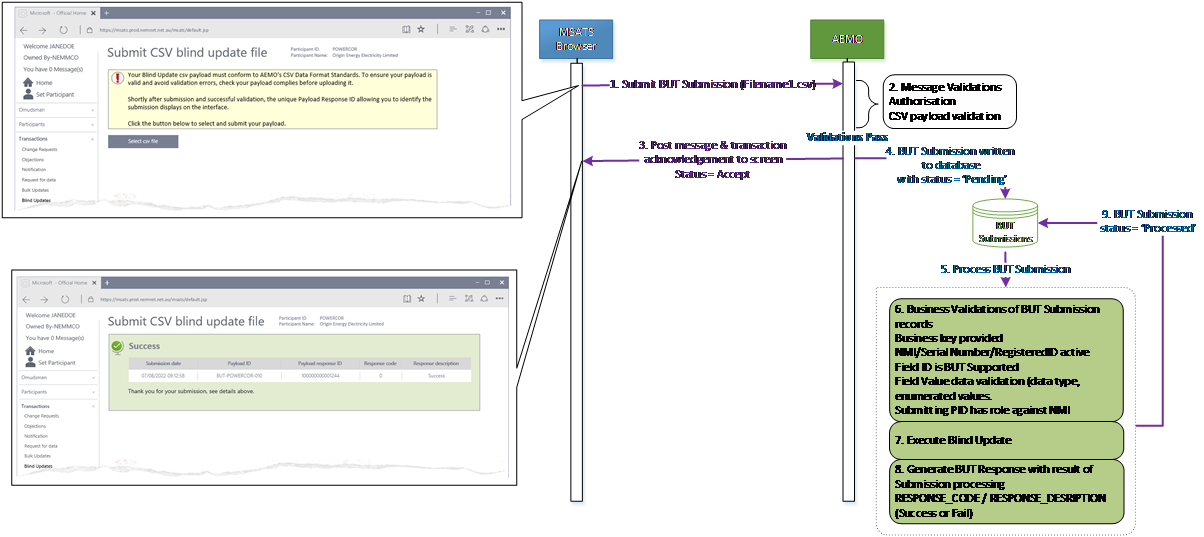
Submission status
For each step in the process, your submission has the following statuses:
|
Who |
Action |
From status |
To status |
Description |
Response? |
|---|---|---|---|---|---|
|
Participant |
Submit |
n/a |
ERROR |
Security & syntax validation fail Applies to the entire payload, not individual rows The entire submission is rejected No further processing |
Acknowledgement Payload is not stored |
|
Participant |
Submit |
n/a |
PENDING |
Security & syntax validation pass Applies to the entire payload, not individual rows Initial accepted status |
Yes, Payload is stored |
|
AEMO |
Process |
PENDING |
PROCESSED |
All rows processed where each payload row is updated with a success or fail reason and a timestamp Result awaiting participant download |
Yes, with row level responses |
|
Participant |
Retrieve result |
PROCESSED |
DOWNLOADED |
BUT end-to-end process complete Downloads can be repeated Only the first download moves status from PROCESSED to DOWNLOADED |
Yes, with row level responses |
Valid submission
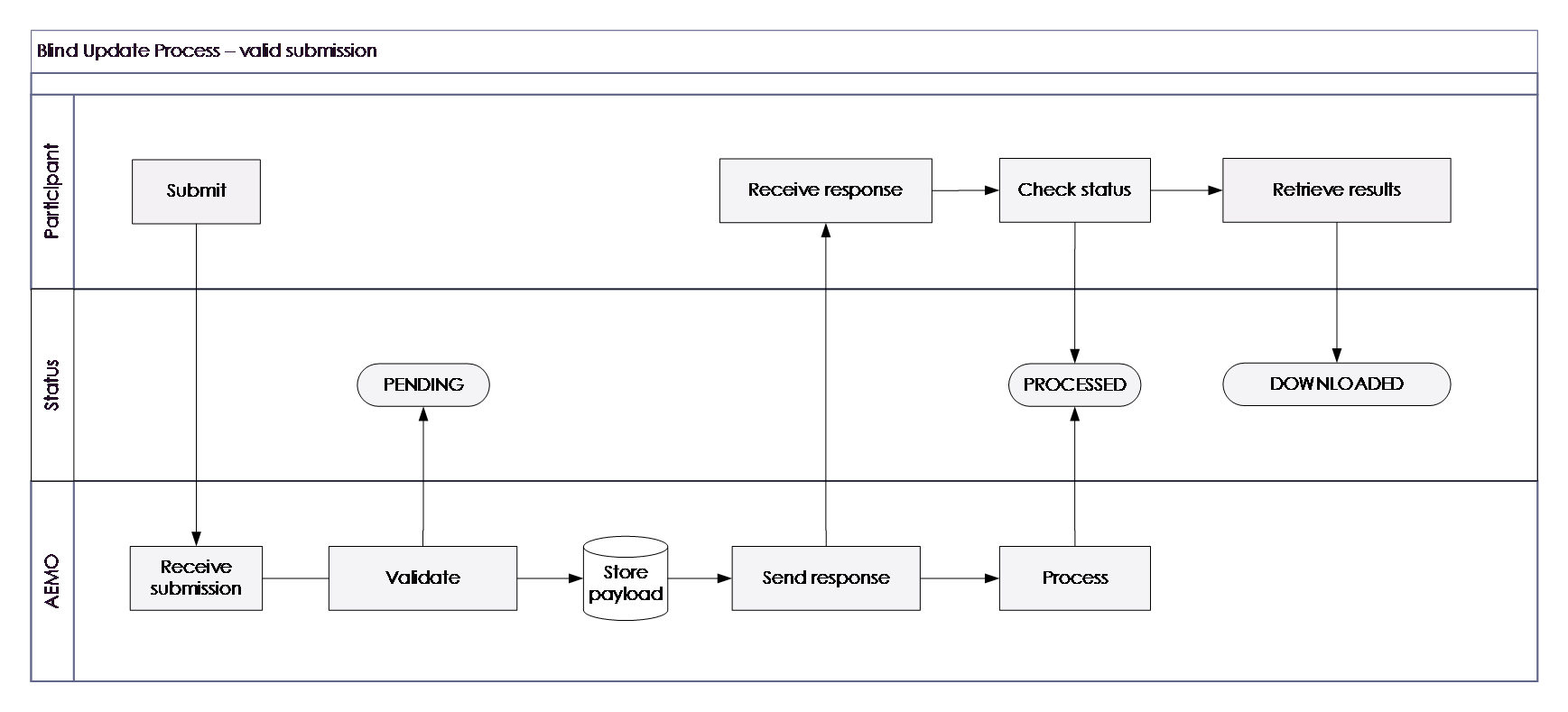
Invalid submission
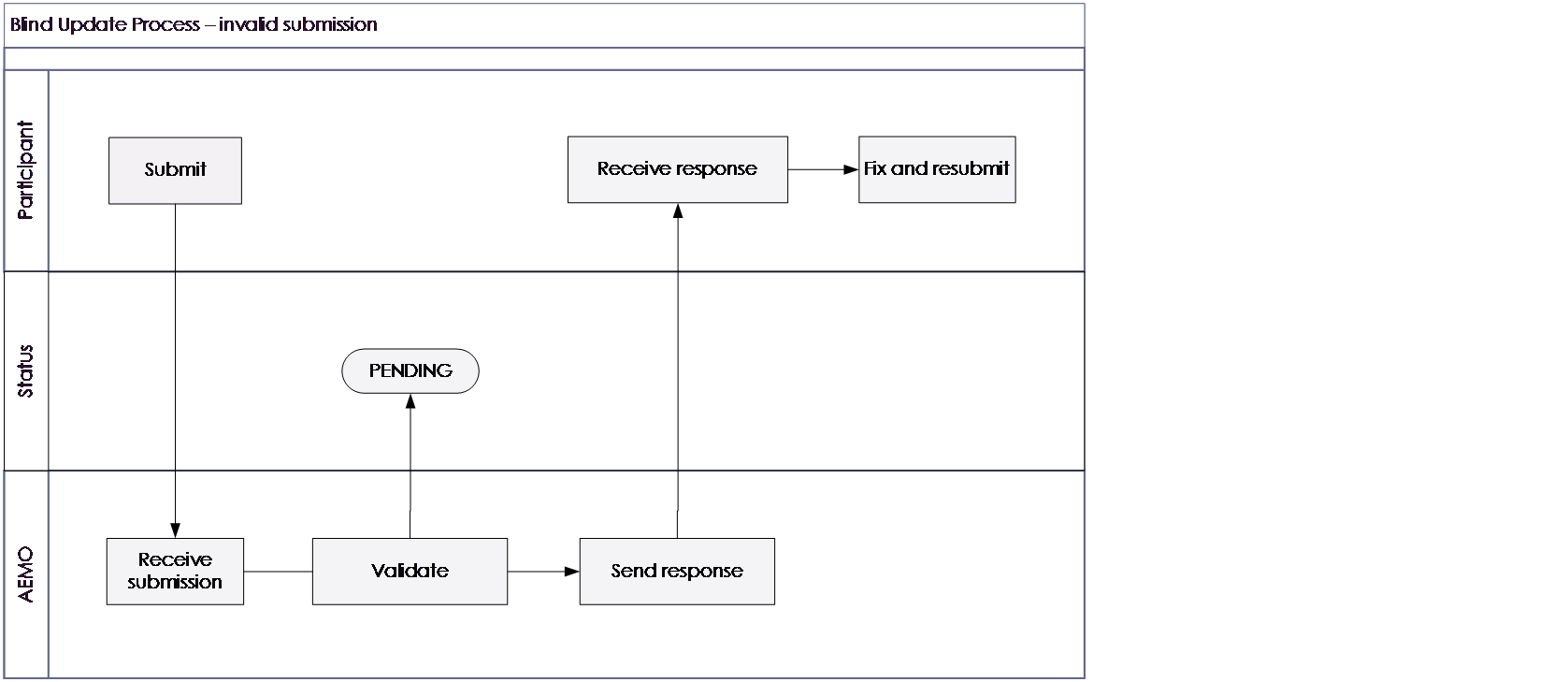
Submission payload and subtypes
There are new record types for Blind Update Submissions:
|
Type |
Payload type |
Payload subtype |
CATS table |
|---|---|---|---|
|
Participant submission |
BLIND_UPDATE_SUBMISSION (BUS) |
NMI_DATA |
NMI DATA |
|
METER_REGISTER |
METER_REGISTER |
||
|
REGISTER_IDENTIFIER |
REGISTER_IDENTIFIER |
||
|
AEMO acknowledgement |
BLIND_UPDATE_TOOL (BUT) |
n/a |
n/a |
|
BLIND UPDATE ACKNOWLEDGEMENT (BUA) |
n/a |
n/a |
|
|
AEMO response |
BLIND_UPDATE_RESPONSE (BUR) |
NMI_DATA |
NMI DATA |
|
AEMO response |
BLIND_UPDATE_RESPONSE (BUR) |
NMI_DATA |
NMI DATA |
|
AEMO response |
BLIND_UPDATE_RESPONSE (BUR) |
METER_REGISTER |
METER_REGISTER |
Business keys
A BUT Submission D field can only contain unique record type business-key combinations. For each record type, the business keys are defined as a combination of the following D fields and the updated column.
|
Subtype |
D row 1 |
D row 2 |
D row 3 |
Column |
Example |
|---|---|---|---|---|---|
|
NMI_DATA |
NMI |
n/a |
n/a |
Section Number |
N123456789,Section 23K |
|
DP Number |
N123456789,DP 825310 |
||||
|
Connection Configuration |
N123456789, L1 |
||||
|
METER_REGISTER |
NMI |
Meter Serial |
n/a |
Controlled Load |
Y, N, EXT |
|
REGISTER_IDENTIFIER |
NMI |
Meter Serial |
Register ID |
Manufacturer |
N123456789,123-AZ56,13, EDMI |
|
Model |
N123456789,123-AZ56,13,Q4 |
||||
|
Read Type Code |
N123456789,123-AZ56,13, RTDA |
||||
|
Use |
N123456789,123-AZ56,13,REVENUE |
||||
|
GPS Coordinates Lat |
N123456789,123-AZ56,13,-37.8886755 |
||||
|
GPS Coordinates Long |
N123456789,123-AZ56,13,+145.1410361 |
Submission rules
The submission:
-
Must adhere to AEMO’s CSV Data Format Standard.
-
Each record in the Blind Update Payload must start with one of the following 3 characters:
-
Must have a C record for its first and last row.
-
Can have each csv Comma Separated Values. A file format for data using commas as delimiters. row containing a single new value for a single column for a specific MSATS record. If you are updating multiple columns for a single MSATS record in the same submission payload, there is one csv row per column.
-
Can have any mixture of tables and columns.
-
Can have mixed BUT record types.
C – comment data
First payload row
The first row of the Blind Update Payload is C and must consist of the following 13 comma separated values:
|
Column |
Row |
Field |
Example |
Data format |
Required |
|---|---|---|---|---|---|
|
A |
C |
Row type (C, I, D) |
C |
UPPERCASE |
ü |
|
B |
C |
SYSTEM |
The AEMO environment: PROD PREPROD |
UPPERCASE |
ü |
|
C |
C |
REPORT ID |
BLIND_UPDATE_SUBMISSION: For participants to send blind update requests to AEMO BLIND_UPDATE_RESPONSE: For AEMO to send blind update responses to participants |
UPPERCASE |
ü |
|
D |
C |
FROM |
PARTICIPANTID |
UPPERCASE |
ü |
|
E |
C |
TO |
NEMMCO |
UPPERCASE |
ü |
|
F |
C |
PAYLOAD CREATION DATE |
2021/09/03 |
YYYY/MM/DD (Market Time e.g. AEST) |
ü |
|
G |
C |
PAYLOAD CREATION TIME |
22:04:05 |
HH24:MI:SS (Market Time) |
ü |
|
H |
C |
EVENT QUEUE ID |
EMMS only. Empty column for BUT submissions |
Blank column |
|
|
I |
C |
DATA MODEL FILE ID |
Blank column |
||
|
J |
C |
EVENT QUEUE GROUP ID |
Blank column |
||
|
K |
C |
MARKET |
NEM |
UPPERCASE |
ü |
|
L |
C |
PAYLOAD ID |
Initiator provided payload reference. It can be any combination of characters; however, it should be unique |
UPPERCASE Free text (50) |
ü |
|
M |
C |
PAYLOAD RESPONSE ID |
Empty for a BLIND_UPDATE_SUBMISSION Responder (AEMO) provided unique payload reference for the BLIND_UPDATE_RESPONSE (e.g. 324-BB321) Also provided in the sync payload acknowledgement |
UPPERCASE |
û |
First record C - participant submission example
The commas represent the H, I, J columns used by other payloads and not used by a Blind Update Payload. These are vital containers in the csv data format structure and cannot be ignored.
C,PROD,BLIND_UPDATE_SUBMISSION,PARTICIPANTID,NEMMCO,2021/09/03,22:04:05,,,,NEM,000000000123002
First C row spreadsheet example

First C row text editor example

Last payload row
The last row in the Payload is also a C row with the record count to check all records are received. The record count includes all rows in the payload (C, I, and D). It must have the following values:
|
Field |
Example |
Data format |
Required |
|---|---|---|---|
|
End of report indicator |
END OF REPORT |
UPPERCASE |
Yes |
|
Count of records |
45917 |
Numeric |
Yes |
Last C row spreadsheet example
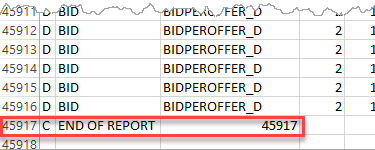
Last C row spreadsheet example

I and D rows
Below are the I – information row and D – data row record definitions for each BUT submission.
NMI_DATA BUT submission
|
Field |
I row |
D row |
Data format/notes |
|---|---|---|---|
|
Record type |
I |
D |
Fixed value |
|
Payload type |
BUS |
BUS |
|
|
Payload subtype |
NMI_DATA |
NMI_DATA |
|
|
Payload version |
1 |
1 |
Fixed value |
|
NMI |
NMI |
N123456789 |
10-character NMI |
|
Field ID |
FIELD |
SHARED_ISOLATION_POINT_FLAG SECTION_NUMBER DP_NUMBER CONNECTION_CONFIGURATION |
For effective dates, see payload types and subtypes String(1) String(20) String(20) String(2) |
|
Value |
VALUE |
Y Section 23K DP 825310 L1 |
See Field details |
NMI_DATA BUT submission example
Spreadsheet

Text

METER_REGISTER BUT submission
|
Field |
I row |
D row |
Data format/Notes |
|---|---|---|---|
|
Record type |
I |
D |
Fixed value |
|
Payload type |
BUS |
BUS |
|
|
Payload subtype |
METER_REGISTER |
METER_REGISTER |
|
|
Payload version |
1 |
1 |
Fixed value |
|
NMI |
NMI |
N123456789 |
10-character NMI |
|
Meter Serial |
METER_SERIAL |
123-AZ56 |
12 characters |
|
Field ID |
FIELD |
GPS_COORDINATES_LAT GPS_COORDINATES_LONG |
For effective dates, see payload types and subtypes |
|
Value |
VALUE |
-37.8409350 144.9464570 |
Decimal(2,7) Decimal(3,7) See Field details |
METER_REGISTER BUT submission example
Validation
There is a change to BUT NMI validation where BUT can update NMIs regardless of their Status Code Energy Rules Terms. This means BUT can update Standing Data for active (NMI Status Code A code used in MSATS to determine if a NMI can be the subject of a retail transfer. For more detail, see the CATS Procedures. = A), not energised (D, G), Extinct (X), or off market NMIs.
MSDR enumerations
So participants can validate the enumerations against the procedures, AEMO will publish Energy Rules Terms the list of enumerations with Code groups and descriptions on the website. We will provide more detail as the design evolves.
Validation rules
Pass
If the entire submission is valid, the Initiator The participant initiating a B2B Interaction. receives a positive Acknowledgement 200 with the response code and description.
Fail
The entire Submission is rejected with a negative message acknowledgment sent to the Initiator if it:
-
Fails header validation
-
Fails CSV Payload validation
-
Fails message level validation
-
Has duplicate update instructions (same field for the same NMI Standing Data record)
-
Where a D row or field within the row fails validation, MSATS does not update the CATS Standing Data field.
-
The submission response D record is updated with the validation failure code and description, for example:
|
Field |
I record |
D Record example |
|---|---|---|
|
Response code |
RESPONSE_CODE |
56 |
|
Response description |
RESPONSE_DESRIPTION |
The participant does not have a current role for the NMI |
ASCII character validation
For schema validation, AEMO follows the W3C XML open standard. The following non-supported CDATA (non-parsed character data) characters do not pass schema validation:
|
& |
|---|
|
> |
|
" |
|
' |
AEMO advises participants to always use the word and to avoid the following error:
<Code description="Schema validation failure">2</Code>
<Explanation>Schema validation failure The entity name must immediately follow the '&' in the entity reference.</Explanation>
Codes and Descriptions
See Guide to Web Blind Update Tool > Validation (draft).
Acknowledgement
Participants receive a message acknowledgment after a BUT submission indicating AEMO received it. This message is acknowledgment of receipt only.
Format
The acknowledgement content is in AEMO’s CSV Data Format Standard.
Acknowledgement payload
|
Field |
Comment |
|---|---|
|
Submission Date |
The submission date and time, e.g. 2022-04-07T10:10:33+10:00 |
|
Payload ID |
The submitting participant provided value in the C record of the BUT Submission CSV Payload, e.g. BUT-PARTID-010 |
|
Payload Response ID |
The AEMO generated unique identifier provided as a reference, e.g. 100000000001244 |
Acknowledgement example

Submission response
Depending on the interface used, participants download (web) or request (API) the submission response.
Format
The content of a submission response is in AEMO’s CSV Data Format Standard.
Submission response contents
The response payload contains the submission payload with the following changes:
-
From and To are reversed
-
Creation time is updated
-
Payload ID is populated with the same value provided by the Initiator in the C row (L column) of the Submission.
-
Response The information returned by an API after a request is made. Responses are usually in JSON or XML format. Payload ID has the AEMO-generated unique identifier provided as a reference in the BUT Submission Message acknowledgment and the BUT Response.
-
BUS Payload Type is changed to BUR
|
Field |
I record |
D Record |
|---|---|---|
|
Response Code |
RESPONSE_CODE |
1 |
|
Response Description |
RESPONSE_DESRIPTION |
Success/Error |
Submission response payload
NMI_DATA BUT response
|
Field |
I row |
D row examples |
Data format/notes |
|---|---|---|---|
|
Record type |
I |
D |
Fixed value I or D |
|
Payload type |
BUR |
BUR |
Identical to the participant provided BUT submission For effective dates, see payload types and subtypes |
|
Payload subtype |
NMI_DATA |
NMI_DATA |
|
|
Payload version |
1 |
1 |
|
|
NMI |
NMI |
N123456789 |
|
|
Field ID |
FIELD |
SHARED_ISOLATION_POINT_FLAG SECTION_NUMBER DP_NUMBER CONNECTION_CONFIGURATION |
|
|
Value |
VALUE |
Y Section 23K DP 825310 L1 |
|
|
Response Code |
RESPONSE_CODE |
1 -nn Etc. |
Numeric result of BUT Submission D record validation |
|
Response description |
RESPONSE_DESRIPTION |
Success/fail |
Character 100 result of BUT Submission D record validation |
BUT response example

METER_REGISTER BUT response
|
Field |
I row |
D row |
Data format/notes |
|---|---|---|---|
|
Record type |
I |
D |
Fixed value I or D |
|
Payload type |
BUR |
BUR |
Identical to the participant provided BUT submission |
|
Payload subtype |
CATS_METER_REGISTER |
CATS_METER_REGISTER |
|
|
Payload version |
1 |
1 |
|
|
Field ID |
FIELD |
GPS_COORDINATES_LAT GPS_COORDINATES_LONG |
For effective dates, see payload types and subtypes |
|
NMI |
NMI |
N123456789 |
|
|
Meter Serial |
METER_SERIAL |
123-AZ56 |
|
|
Register ID |
REGISTER_ID |
13 |
|
|
New Value |
NEW_VALUE |
-37.840935 144.946457 |
|
|
Status |
STATUS |
ERROR UPDATED |
|
|
Return Code |
RETURN_CODE |
1 -nn Etc. |
Numeric result of BUT Submission D record validation |
|
Return Message |
RETURN_MESSAGE |
Success/error description |
Character 100 result of BUT Submission D record validation |
|
Old Value |
OLD_VALUE |
|
|
|
Updated Row ID |
UPDATED_ROW_ID |
nnnnnnnnnnn |
|
|
BUT Update timestamp |
BUT_UPDATE_TS |
yyyy/mm/dd hh24:mi:ss 2022/06/23 09:23:43 |
|
Message response example
You can download the results using the MSATS Web Portal or API
C,PROD,BLIND_UPDATE_TOOL,NEMMCO,PARTICIPANTA,2022/06/03 10:14:42,,,,NEM,,,
I,BUR,METER_REGISTER,1,FIELD,NMI,METER_SERIAL,NEW_VALUE,STATUS,RETURN_CODE,RETURN_MESSAGE,OLD_VALUE,UPDATED_ROW_ID,BUT_UPDATE_TS
I,BUR,NMI_DATA,1,FIELD,NMI,NEW_VALUE,STATUS,RETURN_CODE,RETURN_MESSAGE,OLD_VALUE,UPDATED_ROW_ID,BUT_UPDATE_TS
I,BUR,REGISTER_IDENTIFIER,1,FIELD,NMI,METER_SERIAL,REGISTER_ID,NEW_VALUE,STATUS,RETURN_CODE,RETURN_MESSAGE,OLD_VALUE,UPDATED_ROW_ID,BUT_UPDATE_TS
D,BUR,METER_REGISTER,1,NEXT_SCHEDULED_READ_DATE,2001058020,450899,2022-07-03,ERROR,-25,UMPLP is not privileged to update this Table/Record/Field at this time,,,
D,BUR,METER_REGISTER,1,NEXT_SCHEDULED_READ_DATE,2001527079,450920,2022-07-03,ERROR,-25,UMPLP is not privileged to update this Table/Record/Field at this time,,,
D,BUR,METER_REGISTER,1,NEXT_SCHEDULED_READ_DATE,2001615590,450796,2022-07-03,ERROR,-25,UMPLP is not privileged to update this Table/Record/Field at this time,,,
D,BUR,NMI_DATA,1,CONNECTION_CONFIGURATION,2001000647,AB,ERROR,-14,This field has been updated by a prior BUT run,,,
D,BUR,NMI_DATA,1,CONNECTION_CONFIGURATION,2001000734,AB,ERROR,-14,This field has been updated by a prior BUT run,,,
D,BUR,NMI_DATA,1,CONNECTION_CONFIGURATION,2001003565,AB,ERROR,-14,This field has been updated by a prior BUT run,,,
D,BUR,NMI_DATA,1,DP_NUMBER,2001000647,a DP number,ERROR,-14,This field has been updated by a prior BUT run,,,
D,BUR,NMI_DATA,1,DP_NUMBER,2001000734,a DP number,ERROR,-14,This field has been updated by a prior BUT run,,,
D,BUR,NMI_DATA,1,DP_NUMBER,2001003565,a DP number,ERROR,-14,This field has been updated by a prior BUT run,,,
D,BUR,NMI_DATA,1,SECTION_NUMBER,2001000647,a section number,ERROR,-14,This field has been updated by a prior BUT run,,,
D,BUR,NMI_DATA,1,SECTION_NUMBER,2001000734,a section number,ERROR,-14,This field has been updated by a prior BUT run,,,
D,BUR,NMI_DATA,1,SECTION_NUMBER,2001003565,a section number,ERROR,-14,This field has been updated by a prior BUT run,,,
D,BUR,NMI_DATA,1,SHARED_ISOLATION_POINT_FLAG,2001000647,U,ERROR,-14,This field has been updated by a prior BUT run,,,
D,BUR,NMI_DATA,1,SHARED_ISOLATION_POINT_FLAG,2001000734,U,ERROR,-14,This field has been updated by a prior BUT run,,,
D,BUR,NMI_DATA,1,SHARED_ISOLATION_POINT_FLAG,2001003565,U,ERROR,-14,This field has been updated by a prior BUT run,,,
D,BUR,REGISTER_IDENTIFIER,1,DIAL_FORMAT,2001006971,300531,1,70.21,ERROR,-14,This field has been updated by a prior BUT run,,,
D,BUR,REGISTER_IDENTIFIER,1,DIAL_FORMAT,2001007639,351684,1,70.21,ERROR,-14,This field has been updated by a prior BUT run,,,
D,BUR,REGISTER_IDENTIFIER,1,DIAL_FORMAT,2001007639,351684,2,70.21,ERROR,-14,This field has been updated by a prior BUT run,,,
D,BUR,REGISTER_IDENTIFIER,1,NT_INFO,2001006971,300531,1,R feed,ERROR,-12,Table/Column is not valid for processing at this time,,,
D,BUR,REGISTER_IDENTIFIER,1,NT_INFO,2001007639,351684,1,R feed,ERROR,-12,Table/Column is not valid for processing at this time,,,
D,BUR,REGISTER_IDENTIFIER,1,NT_INFO,2001007639,351684,2,R feed,ERROR,-12,Table/Column is not valid for processing at this time,,,
C,END OF REPORT,26